

Wallet & Top-Up
How Proxio's wallet works, covering topping up by card or crypto, bonus tiers, transaction history, and coupons.
Your Proxio wallet holds a prepaid balance you spend on orders. Top up once, and every order after that (a new Residential package, an ISP or Datacenter service, a renewal) draws from that balance instead of making you pay again. You can also skip the wallet and pay for an order directly by card or crypto if you'd rather not keep a balance.
Topping up
Open Wallet
From the dashboard sidebar, select Wallet.
Choose an amount
Pick one of the quick-select amounts, or enter a custom amount.
Pick a payment method
Choose Card or Crypto. See the table below for how each behaves.
Complete payment
Finish checkout with your payment provider. Your balance updates automatically once payment is confirmed.
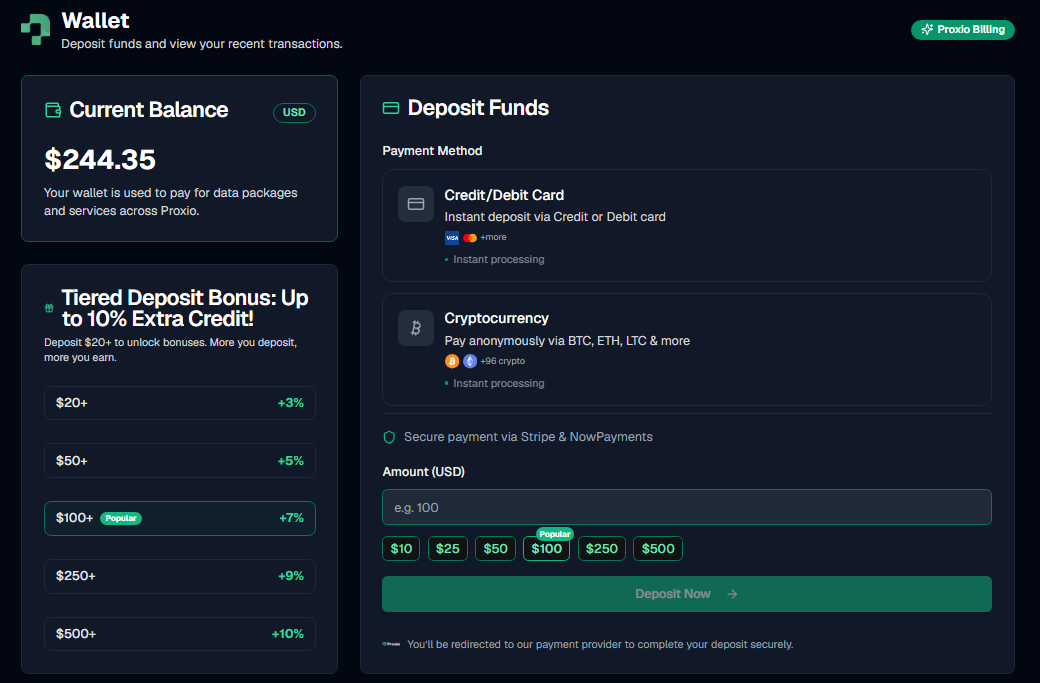
Payment methods
| Method | Processor | Speed |
|---|---|---|
| Card | Stripe | Instant |
| Crypto | NOWPayments (BTC, ETH, LTC, and 90+ other coins) | Credited after the required network confirmations |
Topping up from Telegram
You can also top up through the Telegram bot: it generates a crypto payment link for the amount you pick.
Top-up bonus tiers
The more you top up in one go, the bigger the bonus balance Proxio adds on top:
| Top-up amount | Bonus |
|---|---|
| Under $20 | +0% |
| $20-$49.99 | +3% |
| $50-$99.99 | +5% |
| $100-$249.99 | +7% |
| $250-$499.99 | +9% |
| $500+ | +10% |
The bonus is credited automatically. There's nothing to redeem. For current package pricing, see proxio.net/pricing.
Transaction history
The Wallet page keeps a full history of every top-up and order payment, so you can always see where your balance went.
Coupons
Proxio supports two kinds of coupon codes:
- Order-discount coupons: a percentage or fixed amount off an order's price.
- Product coupons: bonus GB added to a Residential purchase instead of a price discount.
Apply a coupon code when you place or pay for an order.