

Choosing Your Setup
A decision guide for residential proxies that helps you pick a rotation type, a geo scope, and a protocol, or start from a built-in preset or the dashboard's proxy finder.
Before you scale up, decide three things: how IPs should rotate, how tightly to target by location, and which protocol to use. This guide covers the choices for residential proxies; if you're not sure, jump to Start from a preset or let the proxy finder pick for you.
Pick a rotation type
Proxio's residential proxies rotate in one of three ways. You set the type from your username or a saved preset.
| Type | What it does | Reach for it when |
|---|---|---|
| auto | A fresh IP on every request, with no session. | Requests are independent: high-volume scraping, SERP checks, or anything where each hit can safely come from a different IP. |
| sticky | Holds the same IP for the session time you set (1-90 minutes). | You need continuity, such as logins, carts, or multi-step flows that must stay on one IP. |
| smart | Sticky, plus automatic retries on failed connections (optionally a fresh IP per retry). | Flaky targets where you want resilience without writing retry logic yourself. |
Sticky and smart sessions run for a session time of 1 to 90 minutes; the dashboard defaults to 10. Smart rotation adds 1 to 5 extra connection attempts on top of that.
What smart retries do and don't cover
Retries handle connection-level failures only: TCP dial errors, CONNECT timeouts, and 502 / 503 / 504 responses. Content-level errors like a 403 block are not retried. Failed attempts transfer no data and never count against your quota.
Choose your geo scope
You can target three levels of location, from broad to narrow: country, state and city. Country is the most common choice, and it is the one a state or city segment builds on. Adding the state is optional: reach for it when two cities in the same country share a name.
Target as broadly as your use case allows, and only narrow to a state or city when you truly need to. The segment reference, the slugging rules and worked examples are in Geo-Targeting.
Pick a protocol
Both protocols share the same endpoint, geo.proxio.cc:16666. Only the URL
scheme changes.
| Protocol | URL scheme | Use it when |
|---|---|---|
| HTTP / HTTPS | http:// | The default. Works with virtually every client and tool, and tunnels HTTPS sites via CONNECT. |
| SOCKS5 | socks5h:// | Your tool prefers SOCKS, or you want DNS resolved at the exit. |
Use socks5h:// in cURL, Python, and Node.js so DNS resolves through the proxy;
PHP and C# libraries use socks5://. SOCKS5 support covers the CONNECT command.
The full endpoint reference is in
Protocols & Ports.
Start from a preset
Not sure where to begin? Proxio ships built-in rotation presets tuned for common jobs like e-commerce and price tracking, social media, SEO and SERP tracking, general scraping, speed, and long sessions. Each one fills in the rotation type, session time, retries, protocol, and geo scope for you.
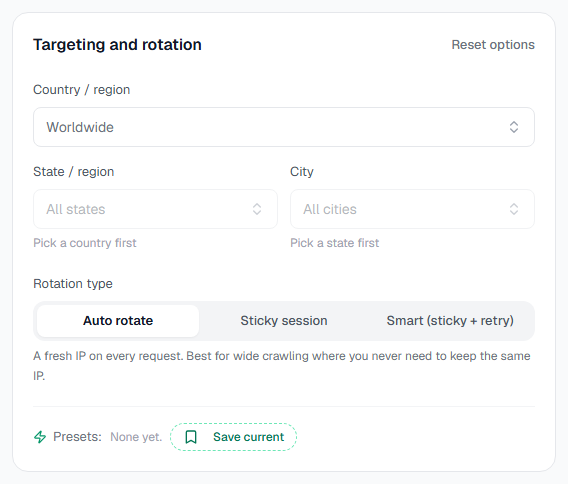
You'll find the presets in the Targeting and rotation panel on your Residential service's Setup tab. You can also save up to 50 of your own private presets. Browse them all in Rotation Presets.
Let the dashboard recommend
Not sure which product fits? On the Buy proxy page, Find my proxy asks a few quick questions about your use case and suggests a product. Once you own a Residential service, the Quick connect card on Overview gives you a working proxy line for a country and rotation type in a couple of clicks, and the full generator on the Setup tab covers everything else.
This guide is for residential
Rotation and geo-targeting are residential features. ISP and datacenter proxies are dedicated IPs with fixed connection details. See ISP & Datacenter proxies.
Where next
Dashboard Tour
A guided walkthrough of dashboard.proxio.net, covering Overview, My proxies, Billing, Help, Developers, Settings, and Ctrl K search.
Proxio API
The Proxio REST API gives you one base URL, one auth scheme, one response envelope, cursor pagination, idempotent writes, signed webhooks, and an OpenAPI 3.1 document. Manage services, credentials, usage, orders, and proxy lists programmatically.