

Geo-Targeting: Country, State & City
How to pin a Proxio Residential exit to a country, state or city using the -region-, -st- and -city- username segments, why state is a code and not a slugged name, and where to find the live location list.
Proxio Residential proxies choose an exit two ways, and you can combine them. Where it is: country, then state or city. Whose network it is on: the autonomous system. Each is a hyphen-delimited segment on the username, and this page is the reference for all four, their slugging rules and how they combine.
| Targets | Segment | Example | Requires |
|---|---|---|---|
| Country | -region-{country} | -region-us | Nothing |
| State / province | -st-{state} | -st-ca | A country |
| City | -city-{city} | -city-losangeles | A country |
| Network operator | -asn-{number} | -asn-7018 | Nothing |
An autonomous system is the block of networks one operator runs under a
single routing policy, and its number identifies that operator on the public
internet. AS7018 is AT&T. So -asn- is how you pick the carrier an exit sits
behind, by number rather than by name: useful when a target treats residential
traffic from one carrier differently from another, and when "somewhere in the
US" is not specific enough.
Look the number up at bgp.he.net or ipinfo.io/AS7018; we do not accept operator names, only the number.
Those four segments are the complete targeting vocabulary. City is the finest geographic level, so a postal code is not something you can pin.
An ASN request fails rather than falling back
-asn- is not a preference. When no exit is available on the network you
named, the connection fails instead of quietly using a different one. That
is deliberate: the reason to name a network is that the others will not do, so
substituting one would be worse than an error.
It also narrows independently of geography, so an ASN plus a city narrows twice and fails more often than either alone. When the request succeeding matters more than the exact carrier, target geographically and leave the ASN off.
How the levels combine
Set a country with -region-, then narrow it with -st-, -city-, or both. The
state segment is independent of the city segment: -region-us-city-newyork targets
New York City directly, and adding -st-ny narrows the same request through
its state. Add the state when two places share a name (-region-us-st-or-city-portland
against -region-us-st-me-city-portland), and leave it out otherwise.
A state or city always needs a country
-st- and -city- only mean something once -region- has set the country.
Without it the gateway has no country to resolve the place against and you get an
untargeted exit.
Country codes
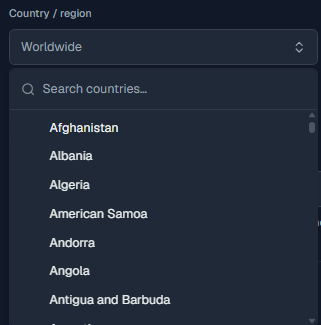
Countries use 2-letter codes, not full names. The dashboard's location selector
emits the correct code for you (for example us), and that is what belongs after
-region-.
| Country | Code |
|---|---|
| United States | us |
| United Kingdom | gb |
| Germany | de |
| France | fr |
| Canada | ca |
| Japan | jp |
These are examples; pick the exact code from the dashboard's selector.
Slugging rules
Slugging applies to the city value only. The rule is simple and mechanical:
- Convert the whole value to lowercase.
- Remove every character that is not
a-zor0-9, which means spaces, hyphens, periods, apostrophes and accented characters all disappear.
So a two-word or punctuated place name collapses into a single run of lowercase letters and digits:
| Location | Slug |
|---|---|
| New York | newyork |
| Winston-Salem | winstonsalem |
| Los Angeles | losangeles |
| Fort Worth | fortworth |
| St. Louis | stlouis |
State is a code, not a slug
-st- does not follow the rule above. It's the ISO 3166-2 subdivision
code, taken exactly as the code field in
GET /locations gives it for that state, not a
mechanical slug of the state's display name. For US states this often looks
like a familiar 2-letter postal abbreviation (ca, ny, tx), but that's a
coincidence, not a rule: plenty of countries use numeric or 3-letter
subdivision codes instead. There's no formula that turns "California" into
ca the way there is for a city name. Read the code from the catalog rather
than guessing it.
You rarely have to do this by hand
When you build a proxy string from the dashboard, the location selectors output the already-correct city slug and state code for you. Slug a city or look up a state code by hand only when you're constructing usernames programmatically.
An unrecognized value fails silently
Send a state or city value that isn't one GET /locations actually returns
for that country (a typo, a stale slug, a full name instead of a code) and
the gateway does not reject it or return an error. It's silently ignored,
and you get an exit that isn't targeted the way you expected. If a location
looks wrong, the value is the first thing to check.
Where to find the live location list
The authoritative, current list of available countries, states and cities lives in
the dashboard: open your Residential service and go to the Setup tab, where the
location selectors show exactly what is available and produce the matching
country code, state code, and city slug. The same catalog is available
programmatically from GET /locations, which returns each
country, state, and city with the exact code value to send, this is the source
of truth if you're building usernames in code rather than copying them from the
dashboard.
Combined examples
Country only:
http://abcxyz123def-region-de:[email protected]:16666Country and state:
http://abcxyz123def-region-us-st-tx:[email protected]:16666Country and city, with no state:
http://abcxyz123def-region-us-city-newyork:[email protected]:16666Country, state and city:
http://abcxyz123def-region-us-st-ny-city-newyork:[email protected]:16666City targeting combined with a sticky session (see Session Types for the session segments):
http://abcxyz123def-region-us-st-ca-city-losangeles-sessid-myapp_9k2p7qz1m4vb1-sesstime-15:[email protected]:16666curl -x "http://abcxyz123def-region-us-st-ca-city-losangeles:[email protected]:16666" https://ipinfo.ioimport requests
proxy = "http://abcxyz123def-region-us-st-ca-city-losangeles:[email protected]:16666"
r = requests.get("https://ipinfo.io", proxies={"http": proxy, "https": proxy})
print(r.json()) # confirm the country / region / cityimport { ProxyAgent } from "undici";
const proxyAuth = Buffer.from(
"abcxyz123def-region-us-st-ca-city-losangeles:PASSWORD"
).toString("base64");
const dispatcher = new ProxyAgent({
uri: "http://geo.proxio.cc:16666",
token: `Basic ${proxyAuth}`,
});
const res = await fetch("https://ipinfo.io", { dispatcher });
console.log(await res.json());Common mistakes
Geo-targeting gotchas
- Full country names. Use the 2-letter code (
us), neverunitedstates. - The state's name instead of its code.
-st-californiadoesn't resolve; the code is-st-ca. Read it fromGET /locationsor the dashboard selector, never by slugging the state's name yourself. - Dropping the country. A state or city without
-region-does not target correctly. - Raw punctuation or spaces.
-city-new yorkor-city-New-Yorkare wrong. Slug first:-city-newyork. - Uppercase. Slugs and codes are lowercase only.
- Typos in the segment key. The gateway silently ignores segment keys it does
not recognize:
-regoin-usproduces no error, just an untargeted exit. If the location looks random, re-check the spelling ofregion,standcity.
If a location comes back wrong, verify the exit against ipinfo.io and re-check
your state code or city slug against GET /locations or
the dashboard selector on the Setup tab.
Targeting & Username Syntax
The master reference for Proxio Residential proxies, covering how the user:pass@host:port connection string works and how to chain country, state, city, sticky-session and smart-retry parameters directly inside the username.
Session Types: Auto, Sticky & Smart
The three Proxio Residential rotation types explained, auto (fresh IP per request), sticky (hold one IP for 1 to 90 minutes) and smart (sticky plus connection retries), with the sessid/sesstime mechanics and exact retry rules.