

Quickstart: Your First Request
Sign up, buy a residential package, grab your credentials, and send a verified proxy request in cURL, Python, Node.js, or PHP, all in under two minutes.
This page gets a working residential proxy request running in under two minutes. You'll create an account, buy a package, copy your credentials, and route a request through Proxio's gateway to confirm your traffic exits from a different IP.
Everything below uses the residential gateway geo.proxio.cc:16666. Replace
USERNAME and PASSWORD with the credentials from your dashboard.
Create your account
Register at dashboard.proxio.net/register. You can sign up with email and password, an email magic link, or a Google, GitHub, or Discord account.
Buy a residential package
Click Buy proxy at the top of the sidebar, choose Residential, pick how much traffic you need, and pay with your wallet balance, card, or crypto. Package prices are listed at proxio.net/pricing. To pay from a balance, top up first under Billing → Wallet; the step-by-step top-up flow (card, crypto, and deposit bonuses) is in Wallet & Top-Up.
Copy your credentials
Open your new service from My proxies → Residential and stay on its
Setup tab. The Connection details card shows your proxy username,
password, and the gateway host and port (geo.proxio.cc:16666), next to
Targeting and rotation and compact code examples.
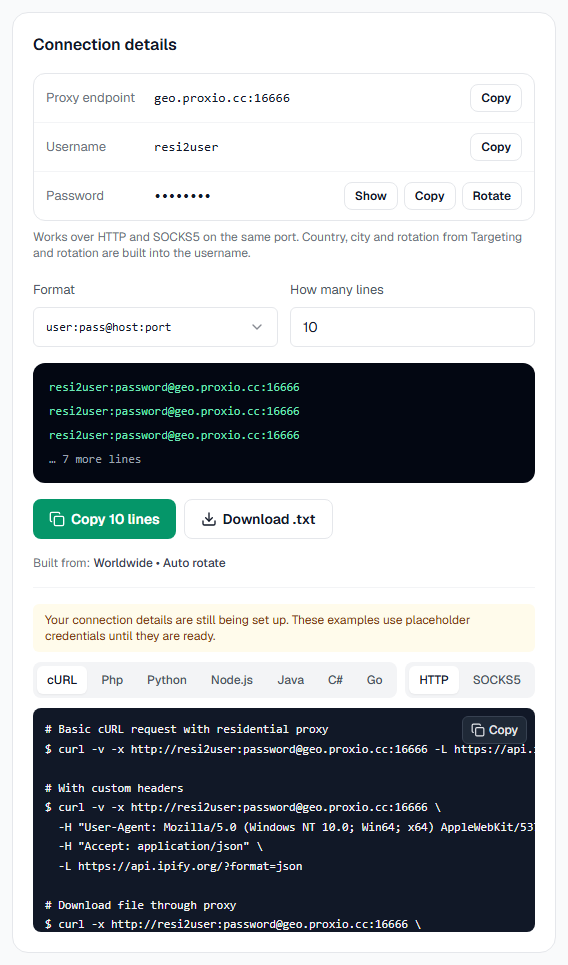
For a quick copy without opening the service, use Quick connect on the Overview page: pick the service, a country, and a rotation type, then copy the line.
Send your first request
Route a request to https://ipinfo.io through the gateway. Pick your language, cURL first:
curl -x http://USERNAME:[email protected]:16666 https://ipinfo.io# pip install requests
import requests
proxy = "http://USERNAME:[email protected]:16666"
resp = requests.get(
"https://ipinfo.io",
proxies={"http": proxy, "https": proxy},
)
print(resp.json())// npm install axios https-proxy-agent
import axios from "axios"
import { HttpsProxyAgent } from "https-proxy-agent"
const agent = new HttpsProxyAgent(
"http://USERNAME:PASSWORD@geo.proxio.cc:16666"
)
const { data } = await axios.get("https://ipinfo.io", {
httpAgent: agent,
httpsAgent: agent,
proxy: false, // required: axios's own proxy handling silently bypasses the agent above
})
console.log(data)<?php
$ch = curl_init("https://ipinfo.io");
curl_setopt($ch, CURLOPT_PROXY, "http://geo.proxio.cc:16666");
curl_setopt($ch, CURLOPT_PROXYUSERPWD, "USERNAME:PASSWORD");
curl_setopt($ch, CURLOPT_RETURNTRANSFER, true);
echo curl_exec($ch);
curl_close($ch);Verify and add a country
The response from ipinfo.io shows the exit IP and its location. If it's a
different IP from your own, your traffic is now flowing through Proxio.
To pin the exit to a specific country, append -region- and a country code to
your username. For a US exit, your base username USERNAME becomes
USERNAME-region-us:
curl -x "http://USERNAME-region-us:[email protected]:16666" https://ipinfo.ioRun it again and the reported country should now be the United States.
Targeting applies to residential
Country, state, and city targeting and rotation are features of the residential gateway. ISP and datacenter proxies are dedicated IPs with fixed connection details. See ISP & Datacenter proxies.