

Usage Statistics
What Proxio's Statistics tab shows, covering today's usage, the 7-day trend, remaining quota, and connection success rate.
Every Residential service has a Statistics tab that shows exactly how much bandwidth you've used, how much is left, and how your connections are performing.
Where to find it
Go to Services, open your Residential service, and select the Statistics tab. The service's Setup tab also carries quick summary cards for the same service, so you don't have to open Statistics just to glance at your usage.
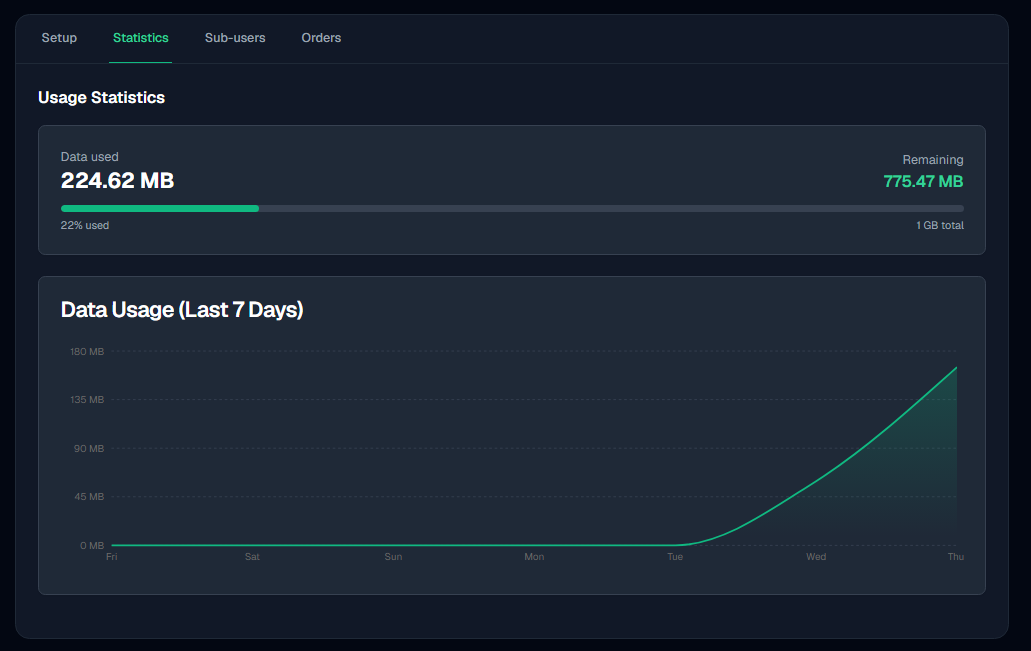
What's on the Statistics tab
- Today's usage counts the current UTC day, so it rolls over at 00:00 UTC rather than at your local midnight.
- Last 7 days charts one point per UTC day.
- Total used vs. limit is cumulative for the package, not for the 7-day window above it.
- Remaining quota is exact to the kilobyte.
- Connections & success rate covers a rolling 7 days and counts connections, not requests, so many requests tunnelled through one connection register once. A connection counts as successful when it closes normally.
Failed and retried connections don't cost you data
A connection attempt that fails or gets retried transfers no data, so it never counts against your quota. Only completed connections do. This holds regardless of which rotation type or retry settings you're using.
Per-credential quota caps
If a credential has its own bandwidth quota cap, that credential stops authenticating once it hits its cap, even if the service as a whole still has quota remaining. See Credentials & Sub-Users for how caps work.
Which figure is authoritative
Remaining quota is the number to bill against and the one to trust. Today's usage and the 7-day chart cover their own time windows, so they answer a different question and will not add up to the total.
Cumulative data used is reported conservatively: the figure you see is never lower than what you were actually charged for.
Orders: Buying, Renewing & Auto-Renewal
How Proxio orders work, covering the order lifecycle, placing and re-paying orders, auto-renewal, and renewal reminders.
Credentials & Sub-Users
Create up to 20 credentials per Residential package, each with its own login, quota cap, sessions, and blocked destinations.