

Orders and Invoices: Buying, Renewing & Auto-Renewal
How Proxio orders work, covering the Orders and invoices page, the order lifecycle, placing and re-paying orders, extending, auto-renewal, and renewal reminders.
Every purchase in Proxio (a new Residential package, an ISP or Datacenter service, more GB, an extension, or a renewal) becomes an order you can track from Billing → Orders and invoices until it's fully provisioned.
Order lifecycle
A new order starts at Pending, shown as Awaiting payment. Once it's paid, it moves to Paid and your service provisions. If payment never completes, the order becomes Canceled or Expired instead. Refunded applies if a paid order is later refunded.
| Status | Meaning |
|---|---|
| Pending (Awaiting payment) | Order created, awaiting payment. |
| Paid | Payment received; your service is being provisioned. |
| Canceled (Cancelled) | Order was canceled before payment completed. |
| Expired | Order was never paid and lapsed. |
| Refunded | A refund was issued for this order. |
ISP & Datacenter delivery can take a moment
Residential packages provision instantly once an order is paid. ISP and Datacenter orders deliver dedicated static IPs, so you may see delivery in progress on the order until your connection details are ready.
Placing an order
- New service: click Buy proxy at the top of the sidebar, choose Residential, ISP, or Datacenter, set the amount, and check out from your wallet balance, card, or crypto. On your first order, Find my proxy can suggest a product from a few quick questions.
- More of what you have: use Add GB on a Residential service, or Buy more IPs on an ISP or Datacenter service.
Re-paying a pending order
If an order is sitting at Pending, you can finish paying for it without starting over.
Open Orders and invoices
From the dashboard sidebar, select Billing → Orders and invoices. An unpaid order also shows up as an alert on Overview and in the notifications bell.
Find the pending order
Locate the order marked Awaiting payment, or open the status tab for it.
Pay it
Click Pay now, then complete checkout from your wallet balance, card, or crypto.
Finding an order
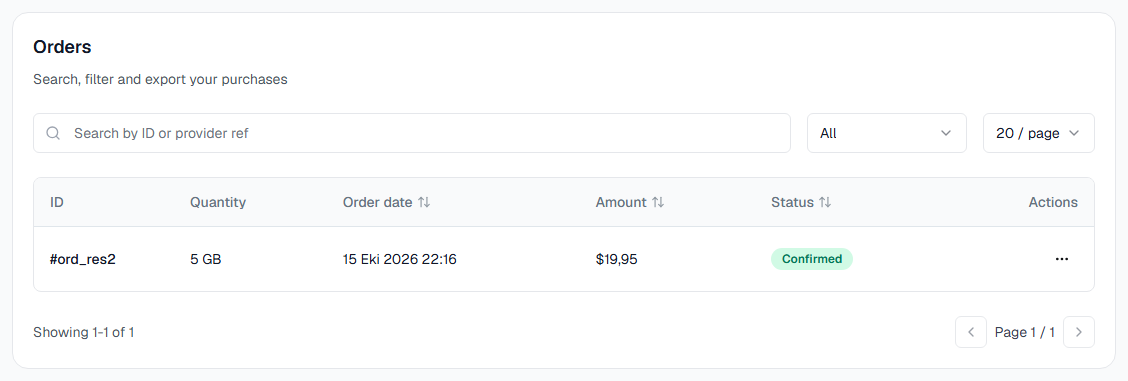
The Orders and invoices page helps you find a specific order instead of scrolling the full history:
- Status tabs: All, Awaiting payment, Paid, Cancelled, Refunded, and Expired.
- Product filter: All products, Residential, ISP, or Datacenter.
- Search by order ID.
- Columns: the product and quantity, the amount, Paid with (Wallet, Card, Crypto, or Bonus), and the status. Extensions and bonus GB orders carry an extension or bonus tag, and ISP and Datacenter orders show how many of the ordered IPs have been delivered.
Open any order to see its invoice. Residential services also have their own Orders tab with the orders for that service.
Extending a service
Manual extension applies to ISP and Datacenter services only, and only on unlimited packages. Use Extend on the service page, in the services list, or on Overview, or pick a period in the service page's renew box. It moves the expiry forward by the period you choose (for example 30, 60, or 90 days, depending on the service), with the price for each period and any discount for a longer one shown before you confirm. Your IPs stay the same. Your remaining traffic is kept as is, only the expiry date changes. The charge is taken from your wallet balance.
Residential services aren't manually extended. They stay current through auto-renewal instead, which charges your wallet the current price for another 3-month (90-day) cycle automatically. If you need more data before your next cycle, use Add GB on the service page to add data now, or turn on Auto add GB to buy it from your wallet when 10% is left.
Auto-renewal
Each service has its own auto-renew switch, on the service's page and in the services list. Turn it on, and Proxio automatically charges your wallet balance to renew that service once it's within 24 hours of expiring, at the current price for the plan. The charge can land at any point inside that final 24 hours rather than at an exact time.
Keep your balance topped up
Auto-renewal charges your wallet balance, not a card directly. Make sure your balance can cover the renewal before it's due.
Renewal reminders
Proxio emails you as a service approaches expiry:
- 24 hours before: a daily reminder, sent at 09:00 UTC.
- About 2 hours before: an urgent warning.
These give you time to top up your wallet or double-check auto-renewal is on. You can also get expiry alerts on Telegram, and switch each alert on or off per channel under Settings → Service alerts. See Notifications & Alerts.
What happens at expiry
A service that isn't renewed in time is deactivated within about an hour of its expiry. For 7 days after it expires, you can still renew it from the service page or the Recently expired card in the services list and keep the same IPs and credentials. After that, buy a new service instead.